WINROVERAUTORADIO
8.8 inch 1920 * 720 Car Stereo for BMW X3 F25 CIC NBT Carplay Android Auto Radio Upgrade Touch Screen DSP Linux System 2011-2016 Bluetooth
8.8 inch 1920 * 720 Car Stereo for BMW X3 F25 CIC NBT Carplay Android Auto Radio Upgrade Touch Screen DSP Linux System 2011-2016 Bluetooth
Dostupnost vyzvednutí nebylo možné načíst
2011 - 2016 For BMW X3 F25 OEM FIT REPLACEMENT 8.8 inch (Built in) BMW Android Screen | GPS | WIFI | BT | A2DP | USB MULTIMEDIA | Built-in Apple CarPlay Android Auto Original CIC/NBT System
Compatible Vehicle:
For BMW X3 F25 X4 F26 (2011–2014) with original CIC system and Audio AUX IN port
For BMW X3 F25 X4 F26 (2014–2016) with original NBT system and Audio AUX IN port
Original Car Console:


OEM original functions retained:
1.iDrive System original joystick Retained
Retains the iDrive system control to allow ease of access to the full range of functions and navigation of the original system.factory comand knob, touch mouse and steering wheel control functions.
2.Amplifier System
Retains the original fiber optic sound system, e.g., your Harman Kardon.
3.Original Radio Retained
Note: This head unit doesn’t have radio player, you can use your vehicle's radio !
4.Original Bluetooth Retained
Even when your iPhone is in CarPlay mode, you could connect your iPhone to the BMW original Bluetooth for a high quality of audio.
5.Backup Camera Display
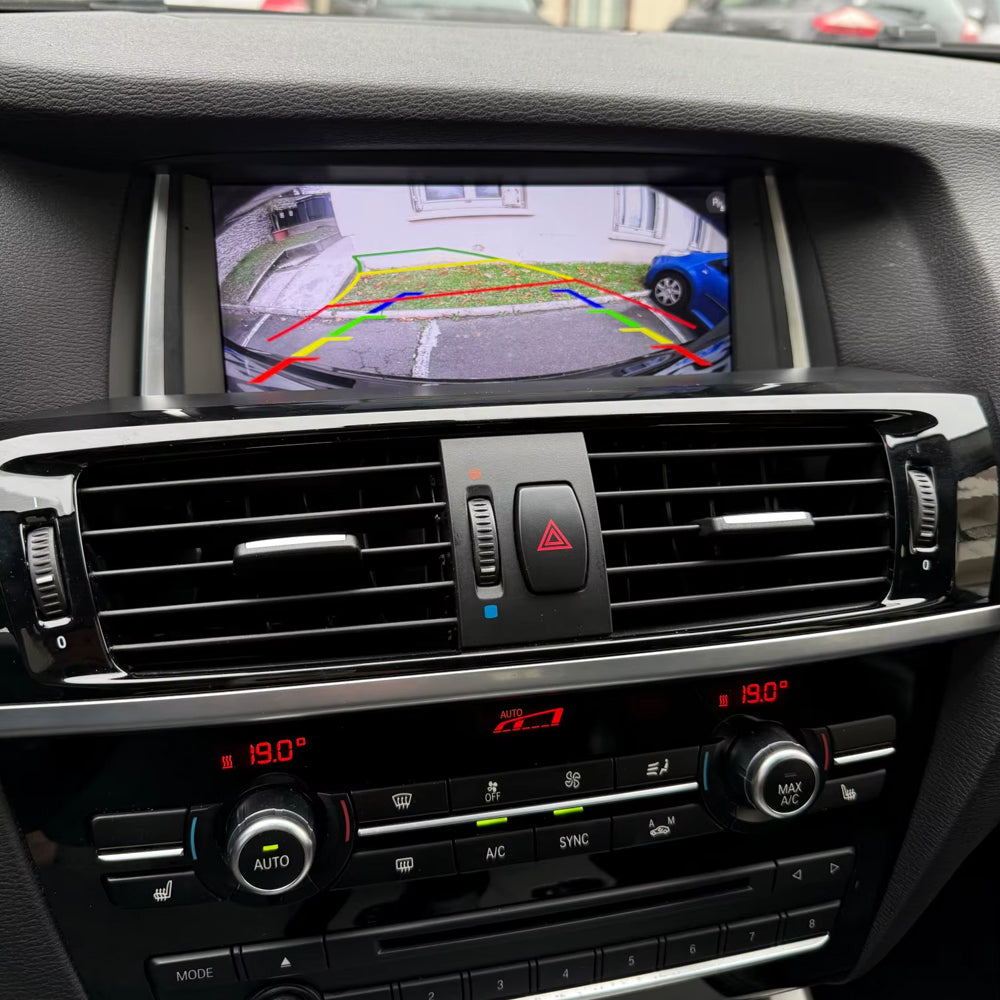
Support factory rear view camera,The OEM factory cameras, parking radar sensors, and dynamic trajectory parking lines are all supported and displayed on the large touchscreen. If you do not have the OEM camera you can add and install an aftermarket AHD 720P backup camera. When you put your car into reverse the backup camera will automatically be displayed on the screen
6.Original CD Player Retained
Now without uninstalling your CD player. Keep the fun of CD music disks.
7.OEM System Retained
When you touch the screen, you could operate the CarPlay or Android Auto functions.From BMW original factory ID controller, you control all radio function and OEM System.
8.Steering Wheel Control Functions
Easily control your music track from your phone, answer calls, or switch sources the power is at your fingers while your eyes are on the road.
Features
1,CarPlay
Built-in Wired Carplay,Use CarPlay USB for wired connections.
Built-in wireless CarPlay,pairing via Bluetooth, transfer via WIFI. you can call contacts and start navigation through voice wake-up, providing a safer and more efficient driving experience for connect your for iphone or Android phone wirelessly for navigation, calls, music, and voice assistant – all via the responsive touchscreen.
CarPlay is a smarter, safer way to use your iPhone while you drive. You can get directions, make calls, send and receive messages, and enjoy music.
Use your phone in safety while you drive.By simply saying "Hey Siri" or "OK Google",to get directions,make calls,send & receive messages,and enjoy your favorite music.Get access to voice commands,Siri & Google Assistant can help you do all of these things
2,Android Auto
Built-in Wired Android auto,Use Android auto USB for wired connections.
Built-in wireless Android Auto, you can use Google Assistant, Google Maps, music player, call contacts, providing a more convenient driving experience.
About Wireless Android Auto Function, For more detail about a compatible phone and country , please view the website by android.
3,AirPlay/Auto-link
Use built-in wireless AirPlay/Auto-link to quickly cast your phone's content to the car's screen and share it with family and friends
4,Day/Night Mode
Automatically switches the daytime/nighttime display mode according to the vehicle lights on to adapt to driving in different light conditions
(Automatic light sensitivity adjusts the display between day and night modes based on your car's original headlights, ensuring a more comfortable driving experience)
5,Support the OEM or after-market Reverse Camera
Please select the correct camera option within Settings, Select Original Camera if it is a factory camera. Select Aftermarket Camera, if you are installing an aftermarket camera.
Note: Does not support aftermarket 360 camera system.
6,Built-in GPS Navigation Preloaded navigation system with for online & offline map support. Always find your way, even without internet access.
7,HD SCREEN,12.3" HD 1920*720 Display with Capacitive Touch Function;
8,Built-in USB,Support Playing Music and Video Via USB.
9,Support Touch Hand Control, Keep original car knob and steering wheel button control,adjust volume, previous song and next song,answer phone call and so on.
FQA:
How to setting OEM Resolution and OEM Camera
Set Oem Resolution
1.Car Setting
2.Original Car's Screen Resolution
3.Select Correct Original Reselution(if you don't know, try to each other)
How to setting AUX,Connect You Aux Audio Cable to the Armrest box
need to active Automatic switch AUX.please check a picture .The AUX of some models directly enters the audio amplifier, you must plug the audio cable (with accessories in the package) into the AUX interface in the armrest box to get the Linux sound.


How to connect power cord precautions,
If your original car has fiber optic cables, please unplug and plug in our power cord as shown in the picture, otherwise there will be no sound.
solve carplay no sound
First make sure to plug in the stock AUX(in the manual gear position or in the passenger side storage box)then go to settings and turn off the AUX auto switching setting